mirror of
https://github.com/jomjol/AI-on-the-edge-device.git
synced 2025-12-10 13:36:54 +03:00
 2ed6fb0f0d
* Add files via upload

* Update main.cpp

* Update main.cpp

* Update main.cpp

* Update Helper.cpp

* Update Helper.h

* Update CMakeLists.txt

* Update CMakeLists.txt

* Update diskio_sdmmc_mh.c

* Update diskio_sdmmc_mh.h

* Update ff_mh.c

* Update vfs_fat_sdmmc_mh.c

* Update sdmmc_common_mh.h

* Update sdmmc_common_mh.c

* Update Helper.cpp

* Update README.md

* Update README.md

* Update README.md

* Update README.md

* Update README.md

* Update README.md

* Update README.md

* Update README.md

* Update README.md

* Update README.md

* Update README.md

* Update README.md

* Update README.md

* Update ff_mh.c

---------

Co-authored-by: CaCO3 <caco3@ruinelli.ch>
279 lines
12 KiB
Markdown
279 lines
12 KiB
Markdown
# AIOTED related changes, see https://github.com/jomjol/AI-on-the-edge-device/pull/2781
|
|
These files/folders were copied from `framework-espidf@3.50002.230601/components/` and adapted to our own needs.
|
|
Since not every SD/MMC was recognized and this was due to the implementation of ATA trim support, this was revised.
|
|
Furthermore, files that we don't need were deleted from it.
|
|
|
|
## The most relevant changes are:
|
|
### fatfs/diskio/diskio_sdmmc.c
|
|
DRESULT ff_sdmmc_ioctl (BYTE pdrv, BYTE cmd, void* buff), at lines 106 to 110 changed from:
|
|
```c
|
|
#if FF_USE_TRIM
|
|
case CTRL_TRIM:
|
|
return ff_sdmmc_trim (pdrv, *((DWORD*)buff), //start_sector
|
|
(*((DWORD*)buff + 1) - *((DWORD*)buff) + 1)); //sector_count
|
|
#endif //FF_USE_TRIM
|
|
```
|
|
to:
|
|
```c
|
|
#if (FF_USE_TRIM)
|
|
case CTRL_TRIM:
|
|
if(FF_CAN_TRIM){
|
|
return ff_sdmmc_trim (pdrv, *((DWORD*)buff), //start_sector
|
|
(*((DWORD*)buff + 1) - *((DWORD*)buff) + 1)); //sector_count
|
|
}
|
|
else{
|
|
return RES_ERROR;
|
|
}
|
|
#endif //FF_USE_TRIM
|
|
```
|
|
|
|
### fatfs/src/ff.c
|
|
added:
|
|
```c
|
|
#include "sdmmc_cmd.h"
|
|
```
|
|
|
|
static FRESULT remove_chain(FFOBJID* obj, DWORD clst, DWORD pclst), at lines 1437 to 1454 changed from:
|
|
```c
|
|
#if FF_FS_EXFAT || FF_USE_TRIM
|
|
if (ecl + 1 == nxt) { /* Is next cluster contiguous? */
|
|
ecl = nxt;
|
|
} else { /* End of contiguous cluster block */
|
|
#if FF_FS_EXFAT
|
|
if (fs->fs_type == FS_EXFAT) {
|
|
res = change_bitmap(fs, scl, ecl - scl + 1, 0); /* Mark the cluster block 'free' on the bitmap */
|
|
if (res != FR_OK) return res;
|
|
}
|
|
#endif
|
|
#if FF_USE_TRIM
|
|
rt[0] = clst2sect(fs, scl); /* Start of data area to be freed */
|
|
rt[1] = clst2sect(fs, ecl) + fs->csize - 1; /* End of data area to be freed */
|
|
disk_ioctl(fs->pdrv, CTRL_TRIM, rt); /* Inform storage device that the data in the block may be erased */
|
|
#endif
|
|
scl = ecl = nxt;
|
|
}
|
|
#endif
|
|
```
|
|
|
|
to:
|
|
```c
|
|
#if FF_FS_EXFAT || FF_USE_TRIM
|
|
if(FF_FS_EXFAT || FF_CAN_TRIM){
|
|
if (ecl + 1 == nxt) { /* Is next cluster contiguous? */
|
|
ecl = nxt;
|
|
}
|
|
else { /* End of contiguous cluster block */
|
|
#if FF_FS_EXFAT
|
|
if (fs->fs_type == FS_EXFAT) {
|
|
res = change_bitmap(fs, scl, ecl - scl + 1, 0); /* Mark the cluster block 'free' on the bitmap */
|
|
if (res != FR_OK) return res;
|
|
}
|
|
#endif
|
|
#if FF_USE_TRIM
|
|
if(FF_CAN_TRIM){
|
|
rt[0] = clst2sect(fs, scl); /* Start of data area to be freed */
|
|
rt[1] = clst2sect(fs, ecl) + fs->csize - 1; /* End of data area to be freed */
|
|
disk_ioctl(fs->pdrv, CTRL_TRIM, rt); /* Inform storage device that the data in the block may be erased */
|
|
}
|
|
#endif
|
|
scl = ecl = nxt;
|
|
}
|
|
}
|
|
#endif
|
|
```
|
|
|
|
FRESULT f_mkfs(const TCHAR* path, const MKFS_PARM* opt, void* work, UINT len), at lines 5946 to 5949 changed from:
|
|
```c
|
|
#if FF_USE_TRIM
|
|
lba[0] = b_vol; lba[1] = b_vol + sz_vol - 1; /* Inform storage device that the volume area may be erased */
|
|
disk_ioctl(pdrv, CTRL_TRIM, lba);
|
|
#endif
|
|
```
|
|
to:
|
|
```c
|
|
#if FF_USE_TRIM
|
|
if(FF_CAN_TRIM){
|
|
lba[0] = b_vol; lba[1] = b_vol + sz_vol - 1; /* Inform storage device that the volume area may be erased */
|
|
disk_ioctl(pdrv, CTRL_TRIM, lba);
|
|
}
|
|
#endif
|
|
```
|
|
|
|
FRESULT f_mkfs(const TCHAR* path, const MKFS_PARM* opt, void* work, UINT len), at lines 6175 to 6178 changed from:
|
|
```c
|
|
#if FF_USE_TRIM
|
|
lba[0] = b_vol; lba[1] = b_vol + sz_vol - 1; /* Inform storage device that the volume area may be erased */
|
|
disk_ioctl(pdrv, CTRL_TRIM, lba);
|
|
#endif
|
|
```
|
|
to:
|
|
```c
|
|
#if FF_USE_TRIM
|
|
if(FF_CAN_TRIM){
|
|
lba[0] = b_vol; lba[1] = b_vol + sz_vol - 1; /* Inform storage device that the volume area may be erased */
|
|
disk_ioctl(pdrv, CTRL_TRIM, lba);
|
|
}
|
|
#endif
|
|
```
|
|
|
|
### sdmmc/sdmmc_cmd.c
|
|
added:
|
|
```c
|
|
int FF_CAN_TRIM = 0;
|
|
```
|
|
|
|
esp_err_t sdmmc_can_trim(sdmmc_card_t* card), at lines 630 to 636 changed from:
|
|
```c
|
|
esp_err_t sdmmc_can_trim(sdmmc_card_t* card)
|
|
{
|
|
if ((card->is_mmc) && (card->ext_csd.sec_feature & EXT_CSD_SEC_GB_CL_EN)) {
|
|
return ESP_OK;
|
|
}
|
|
return ESP_FAIL;
|
|
}
|
|
```
|
|
to:
|
|
```c
|
|
esp_err_t sdmmc_can_trim(sdmmc_card_t* card)
|
|
{
|
|
if ((card->is_mmc) && (card->ext_csd.sec_feature & EXT_CSD_SEC_GB_CL_EN)) {
|
|
FF_CAN_TRIM = 1;
|
|
return ESP_OK;
|
|
}
|
|
FF_CAN_TRIM = 0;
|
|
return ESP_FAIL;
|
|
}
|
|
```
|
|
|
|
### sdmmc/include/sdmmc_cmd.h
|
|
|
|
added:
|
|
```c
|
|
extern int FF_CAN_TRIM;
|
|
```
|
|
|
|
# Espressif IoT Development Framework
|
|
|
|
* [中文版](./README_CN.md)
|
|
|
|
ESP-IDF is the development framework for Espressif SoCs supported on Windows, Linux and macOS.
|
|
|
|
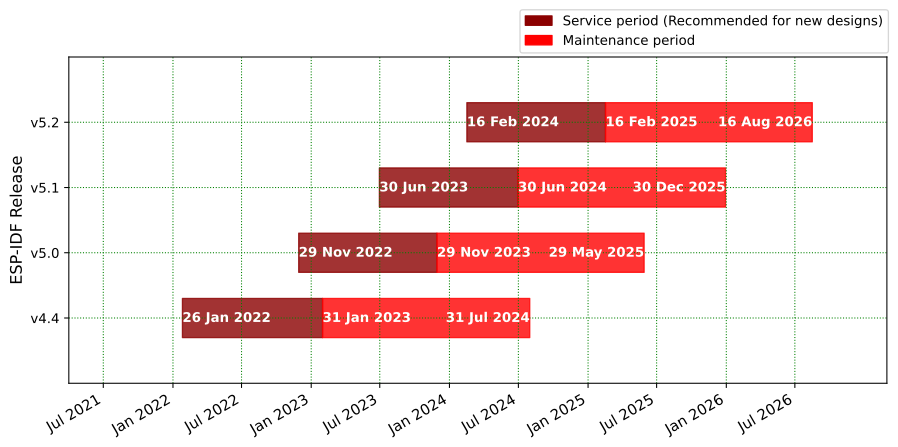
# ESP-IDF Release Support Schedule
|
|
|
|
|
|
|
|
- Please read [the support policy](SUPPORT_POLICY.md) and [the documentation](https://docs.espressif.com/projects/esp-idf/en/latest/esp32/versions.html) for more information about ESP-IDF versions.
|
|
- Please see the [End-of-Life Advisories](https://www.espressif.com/en/support/documents/advisories?keys=&field_type_of_advisory_tid%5B%5D=817) for information about ESP-IDF releases with discontinued support.
|
|
|
|
# ESP-IDF Release and SoC Compatibility
|
|
|
|
The following table shows ESP-IDF support of Espressif SoCs where ![alt text][preview] and ![alt text][supported] denote preview status and support, respectively. The preview support is usually limited in time and intended for beta versions of chips. Please use an ESP-IDF release where the desired SoC is already supported.
|
|
|
|
|Chip | v4.1 | v4.2 | v4.3 | v4.4 | v5.0 | |
|
|
|:----------- |:---------------------:| :---------------------:| :---------------------:| :---------------------:| :---------------------:|:------------------------------------------------------------------------------------ |
|
|
|ESP32 |![alt text][supported] | ![alt text][supported] | ![alt text][supported] | ![alt text][supported] | ![alt text][supported] | |
|
|
|ESP32-S2 | | ![alt text][supported] | ![alt text][supported] | ![alt text][supported] | ![alt text][supported] | |
|
|
|ESP32-C3 | | | ![alt text][supported] | ![alt text][supported] | ![alt text][supported] | |
|
|
|ESP32-S3 | | | | ![alt text][supported] | ![alt text][supported] | [Announcement](https://www.espressif.com/en/news/ESP32_S3) |
|
|
|ESP32-C2 | | | | | ![alt text][supported] | [Announcement](https://blog.espressif.com/esp32-c2-and-why-it-matter-s-bcf4d7d0b2c6) |
|
|
|ESP32-H2 | | | | ![alt text][preview] | ![alt text][preview] | [Announcement](https://www.espressif.com/en/news/ESP32_H2) |
|
|
|
|
[supported]: https://img.shields.io/badge/-supported-green "supported"
|
|
[preview]: https://img.shields.io/badge/-preview-orange "preview"
|
|
|
|
Espressif SoCs released before 2016 (ESP8266 and ESP8285) are supported by [RTOS SDK](https://github.com/espressif/ESP8266_RTOS_SDK) instead.
|
|
|
|
# Developing With ESP-IDF
|
|
|
|
## Setting Up ESP-IDF
|
|
|
|
See https://idf.espressif.com/ for links to detailed instructions on how to set up the ESP-IDF depending on chip you use.
|
|
|
|
**Note:** Each SoC series and each ESP-IDF release has its own documentation. Please see Section [Versions](https://docs.espressif.com/projects/esp-idf/en/latest/esp32/versions.html) on how to find documentation and how to checkout specific release of ESP-IDF.
|
|
|
|
### Non-GitHub forks
|
|
|
|
ESP-IDF uses relative locations as its submodules URLs ([.gitmodules](.gitmodules)). So they link to GitHub. If ESP-IDF is forked to a Git repository which is not on GitHub, you will need to run the script [tools/set-submodules-to-github.sh](tools/set-submodules-to-github.sh) after git clone.
|
|
|
|
The script sets absolute URLs for all submodules, allowing `git submodule update --init --recursive` to complete. If cloning ESP-IDF from GitHub, this step is not needed.
|
|
|
|
## Finding a Project
|
|
|
|
As well as the [esp-idf-template](https://github.com/espressif/esp-idf-template) project mentioned in Getting Started, ESP-IDF comes with some example projects in the [examples](examples) directory.
|
|
|
|
Once you've found the project you want to work with, change to its directory and you can configure and build it.
|
|
|
|
To start your own project based on an example, copy the example project directory outside of the ESP-IDF directory.
|
|
|
|
# Quick Reference
|
|
|
|
See the Getting Started guide links above for a detailed setup guide. This is a quick reference for common commands when working with ESP-IDF projects:
|
|
|
|
## Setup Build Environment
|
|
|
|
(See the Getting Started guide listed above for a full list of required steps with more details.)
|
|
|
|
* Install host build dependencies mentioned in the Getting Started guide.
|
|
* Run the install script to set up the build environment. The options include `install.bat` or `install.ps1` for Windows, and `install.sh` or `install.fish` for Unix shells.
|
|
* Run the export script on Windows (`export.bat`) or source it on Unix (`source export.sh`) in every shell environment before using ESP-IDF.
|
|
|
|
## Configuring the Project
|
|
|
|
* `idf.py set-target <chip_name>` sets the target of the project to `<chip_name>`. Run `idf.py set-target` without any arguments to see a list of supported targets.
|
|
* `idf.py menuconfig` opens a text-based configuration menu where you can configure the project.
|
|
|
|
## Compiling the Project
|
|
|
|
`idf.py build`
|
|
|
|
... will compile app, bootloader and generate a partition table based on the config.
|
|
|
|
## Flashing the Project
|
|
|
|
When the build finishes, it will print a command line to use esptool.py to flash the chip. However you can also do this automatically by running:
|
|
|
|
`idf.py -p PORT flash`
|
|
|
|
Replace PORT with the name of your serial port (like `COM3` on Windows, `/dev/ttyUSB0` on Linux, or `/dev/cu.usbserial-X` on MacOS. If the `-p` option is left out, `idf.py flash` will try to flash the first available serial port.
|
|
|
|
This will flash the entire project (app, bootloader and partition table) to a new chip. The settings for serial port flashing can be configured with `idf.py menuconfig`.
|
|
|
|
You don't need to run `idf.py build` before running `idf.py flash`, `idf.py flash` will automatically rebuild anything which needs it.
|
|
|
|
## Viewing Serial Output
|
|
|
|
The `idf.py monitor` target uses the [idf_monitor tool](https://docs.espressif.com/projects/esp-idf/en/latest/get-started/idf-monitor.html) to display serial output from Espressif SoCs. idf_monitor also has a range of features to decode crash output and interact with the device. [Check the documentation page for details](https://docs.espressif.com/projects/esp-idf/en/latest/get-started/idf-monitor.html).
|
|
|
|
Exit the monitor by typing Ctrl-].
|
|
|
|
To build, flash and monitor output in one pass, you can run:
|
|
|
|
`idf.py flash monitor`
|
|
|
|
## Compiling & Flashing Only the App
|
|
|
|
After the initial flash, you may just want to build and flash just your app, not the bootloader and partition table:
|
|
|
|
* `idf.py app` - build just the app.
|
|
* `idf.py app-flash` - flash just the app.
|
|
|
|
`idf.py app-flash` will automatically rebuild the app if any source files have changed.
|
|
|
|
(In normal development there's no downside to reflashing the bootloader and partition table each time, if they haven't changed.)
|
|
|
|
## Erasing Flash
|
|
|
|
The `idf.py flash` target does not erase the entire flash contents. However it is sometimes useful to set the device back to a totally erased state, particularly when making partition table changes or OTA app updates. To erase the entire flash, run `idf.py erase-flash`.
|
|
|
|
This can be combined with other targets, ie `idf.py -p PORT erase-flash flash` will erase everything and then re-flash the new app, bootloader and partition table.
|
|
|
|
# Resources
|
|
|
|
* Documentation for the latest version: https://docs.espressif.com/projects/esp-idf/. This documentation is built from the [docs directory](docs) of this repository.
|
|
|
|
* The [esp32.com forum](https://esp32.com/) is a place to ask questions and find community resources.
|
|
|
|
* [Check the Issues section on github](https://github.com/espressif/esp-idf/issues) if you find a bug or have a feature request. Please check existing Issues before opening a new one.
|
|
|
|
* If you're interested in contributing to ESP-IDF, please check the [Contributions Guide](https://docs.espressif.com/projects/esp-idf/en/latest/contribute/index.html).
|