 de92c29245
* enable PSRAM logging

* add extra functions for psram shared memroy handling

* CImageBasis objects still should used dynamic memory (eg. rawImage), haw ever tmpImage must be placed inside the shared memory

* Place all STBI allocs inside the shared memory

* The models are placed in the shared PSRAM reagion and must be allocated through the dedicated functions

* .

* renaming

* fix cast warning

* add flag to switch STBI PSRAM usage

* improve PSRAM shared handling

* reserve shared PSRAM as early as possible

* init logging eralier so we can use it in PSRAM shared alloc

* move Wifi_LWIP, BSS_SEG and MQTT Outbox into PSRAM to ffree internal memory

* Check if model fits into reserved shared memory

* Update code/components/jomjol_tfliteclass/CTfLiteClass.cpp

* Update code/components/jomjol_helper/psram.cpp

* Update code/components/jomjol_helper/psram.cpp

* Update code/components/jomjol_flowcontroll/ClassFlowControll.cpp

* Update code/components/jomjol_helper/psram.cpp

* Update code/components/jomjol_helper/psram.cpp

* Update code/components/jomjol_helper/psram.cpp

* Update code/components/jomjol_image_proc/CImageBasis.cpp

* Update code/components/jomjol_helper/psram.cpp

* Update code/components/jomjol_helper/psram.cpp

* Update code/components/jomjol_helper/psram.cpp

* Update code/components/jomjol_helper/psram.cpp

* Update code/components/jomjol_helper/psram.cpp

* Update code/components/jomjol_helper/psram.cpp

* Update code/components/jomjol_helper/psram.cpp

* .

* .

* .

* .

* Korrektur Merge Conflict in main.cpp

---------

Co-authored-by: CaCO3 <caco@ruinelli.ch>
Co-authored-by: jomjol <30766535+jomjol@users.noreply.github.com>
Build
Preparations
git clone https://github.com/jomjol/AI-on-the-edge-device.git
cd AI-on-the-edge-device
git checkout rolling
git submodule update --init
Build and Flash within terminal
See further down to build it within an IDE.
Compile
cd code
platformio run --environment esp32cam
Upload
pio run --target upload --upload-port /dev/ttyUSB0
Alternatively you also can set the UART device in platformio.ini, eg. upload_port = /dev/ttyUSB0
Monitor UART Log
pio device monitor -p /dev/ttyUSB0
Build and Flash with Visual Code IDE
-
Download and install VS Code
-
Install the VS Code platform io plugin
-
- Check for error messages, maybe you need to manually add some python libraries
- e.g. in my Ubuntu a python3-env was missing:
sudo apt-get install python3-venv
- e.g. in my Ubuntu a python3-env was missing:
-
-
git clone this project
-
in Linux:
git clone https://github.com/jomjol/AI-on-the-edge-device.git
cd AI-on-the-edge-device
git checkout rolling
git submodule update --init
-
-
in VS code, open the
AI-on-the-edge-device/code- from terminal:
cd AI-on-the-edge-device/code && code .
- from terminal:
-
open a pio terminal (click on the terminal sign in the bottom menu bar)
-
make sure you are in the
codedirectory -
To build, type
platformio run --environment esp32cam- or use the graphical interface:
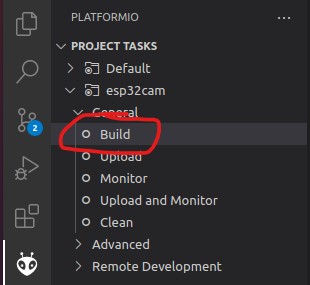
- the build artifacts are stored in
code/.pio/build/esp32cam/
- or use the graphical interface:
-
Connect the device and type
pio device monitor. There you will see your device and can copy the name to the next instruction -
Add
upload_port = you_device_portto theplatformio.inifile -
make sure an sd card with the contents of the
sd_cardfolder is inserted and you have changed the wifi details -
pio run --target eraseto erase the flash -
pio run --target uploadthis will upload thebootloader.bin, partitions.bin,firmware.binfrom thecode/.pio/build/esp32cam/folder. -
pio device monitorto observe the logs via uart