 76f45a5927
* delete HTML directory on an update

* delete HTML directory on an update

* rename html folder

* swap HTML folders after extracting

* .

* .

* .

* .

* .

* .

* move SD card check, SD card directories setup and update to before the PSRAM init.
The update should be as early as possible to allow updates even if the PSRAM or cam fails.

* .

* .

* Update Helper.cpp

* Update Helper.h

* .

---------

Co-authored-by: CaCO3 <caco@ruinelli.ch>
Co-authored-by: SybexX <Heinrich-Tuning@web.de>
Build
Preparations
git clone https://github.com/jomjol/AI-on-the-edge-device.git
cd AI-on-the-edge-device
git checkout rolling
git submodule update --init
Update Submodules
cd /components/submodule-name (e.g. tflite-micro-example)
git checkout VERSION (e.g. HASH of latest tflite-micro-example build)
cd ../../ (auf Ebene von code)
git submodule update --init
Evt. muss man vorher noch einige Verzeichnisse in compenents von Hand löschen, da sie beim checkout nicht gelöscht wurden (vor update -- init)
Build and Flash within terminal
See further down to build it within an IDE.
Compile
cd code
platformio run --environment esp32cam
Upload
pio run --target upload --upload-port /dev/ttyUSB0
Alternatively you also can set the UART device in platformio.ini, eg. upload_port = /dev/ttyUSB0
Monitor UART Log
pio device monitor -p /dev/ttyUSB0
Build and Flash with Visual Code IDE
-
Download and install VS Code
-
Install the VS Code platform io plugin
-
- Check for error messages, maybe you need to manually add some python libraries
- e.g. in my Ubuntu a python3-env was missing:
sudo apt-get install python3-venv
- e.g. in my Ubuntu a python3-env was missing:
-
-
git clone this project
-
in Linux:
git clone https://github.com/jomjol/AI-on-the-edge-device.git
cd AI-on-the-edge-device
git checkout rolling
git submodule update --init
-
-
in VS code, open the
AI-on-the-edge-device/code- from terminal:
cd AI-on-the-edge-device/code && code .
- from terminal:
-
open a pio terminal (click on the terminal sign in the bottom menu bar)
-
make sure you are in the
codedirectory -
To build, type
platformio run --environment esp32cam- or use the graphical interface:
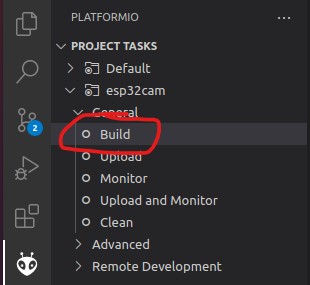
- the build artifacts are stored in
code/.pio/build/esp32cam/
- or use the graphical interface:
-
Connect the device and type
pio device monitor. There you will see your device and can copy the name to the next instruction -
Add
upload_port = you_device_portto theplatformio.inifile -
make sure an sd card with the contents of the
sd_cardfolder is inserted and you have changed the wifi details -
pio run --target eraseto erase the flash -
pio run --target uploadthis will upload thebootloader.bin, partitions.bin,firmware.binfrom thecode/.pio/build/esp32cam/folder. -
pio device monitorto observe the logs via uart
Update Parameters
If you create or rename a parameter, make sure to update its documentation in ../param-docs/parameter-pages! Check the ../param-docs/README.md for more information.