 5dc7bb949a
* Show image for flow not started + take image

* Update

* Adding new images

* .

* Avoid multiple Access-Control-Allow-Origin * (#1859)

* Avoid multiple Access-Control-Allow-Origin *

* Adapt loglevel to debug

* Update build.yaml

* .

* New state "initialization (delayed)", renaming

* Overview: Renamed "Status" + switched position

* Improve data logging on errors (#1839)

* use error level for log if "Rate to High" or "Negative Rate"

* remove redundant data logging

* .

* .

* update time also in case of an error

* move calculation of difference to the top as discussed in PR 1839

Co-authored-by: CaCO3 <caco@ruinelli.ch>

* Heap tracing (#1861)

* Update sdkconfig.esp32cam-dev-task-analysis.defaults

* Update defines.h

* Update platformio.ini

* Update main.cpp

* Update defines.h

* Update ClassFlowCNNGeneral.cpp

* Update platformio.ini

* disable HIMEM (external > 4mb ram) not used (#1864)

#force disable HIMEM as not used in default config, can be enabled with [env:esp32cam-dev-himem]
#free 256kb of internal memory :
#I (2112) esp_himem: Initialized. Using last 8 32KB address blocks for bank switching on 4352 KB of physical memory.
CONFIG_SPIRAM_BANKSWITCH_ENABLE=n
#CONFIG_SPIRAM_BANKSWITCH_RESERVE is not set

* Update ota_page.html (#1866)

Fixed the firework to match the actual button text.
Fixed other random typos.

* add AlignmentAlgo=off option (#1867)

* Replace outdated wiki links, wording (#1871)

* Revert "add AlignmentAlgo=off option (#1867)" (#1876)

This reverts commit 3de4cc7c56.

* fixed typo (#1881)

Co-authored-by: CaCO3 <caco@ruinelli.ch>

* Show WIFI signal text labels / Log RSSI value to logfile (#1877)

* Overview: WIFI RSSI strength text labels

* Log RSSI value (debug level)

* Typo

* Update config.ini (#1880)

* Update Changelog.md for  release (#1892)

Co-authored-by: github-actions <github-actions@github.com>

* Update Changelog.md

* Remove newline in version (#1891)

* remove newline in version

* .

* .

Co-authored-by: CaCO3 <caco@ruinelli.ch>

Co-authored-by: CaCO3 <caco@ruinelli.ch>
Co-authored-by: CaCO3 <caco3@ruinelli.ch>
Co-authored-by: Nicolas Liaudat <nliaudat@users.noreply.github.com>
Co-authored-by: AngryApostrophe <89547888+AngryApostrophe@users.noreply.github.com>
Co-authored-by: github-actions <github-actions@github.com>
Build
Preparations
git clone https://github.com/jomjol/AI-on-the-edge-device.git
cd AI-on-the-edge-device
git checkout rolling
git submodule update --init
Build and Flash within terminal
See further down to build it within an IDE.
Compile
cd code
platformio run --environment esp32cam
Upload
pio run --target upload --upload-port /dev/ttyUSB0
Alternatively you also can set the UART device in platformio.ini, eg. upload_port = /dev/ttyUSB0
Monitor UART Log
pio device monitor -p /dev/ttyUSB0
Build and Flash with Visual Code IDE
-
Download and install VS Code
-
Install the VS Code platform io plugin
-
- Check for error messages, maybe you need to manually add some python libraries
- e.g. in my Ubuntu a python3-env was missing:
sudo apt-get install python3-venv
- e.g. in my Ubuntu a python3-env was missing:
-
-
git clone this project
-
in Linux:
git clone https://github.com/jomjol/AI-on-the-edge-device.git
cd AI-on-the-edge-device
git checkout rolling
git submodule update --init
-
-
in VS code, open the
AI-on-the-edge-device/code- from terminal:
cd AI-on-the-edge-device/code && code .
- from terminal:
-
open a pio terminal (click on the terminal sign in the bottom menu bar)
-
make sure you are in the
codedirectory -
To build, type
platformio run --environment esp32cam- or use the graphical interface:
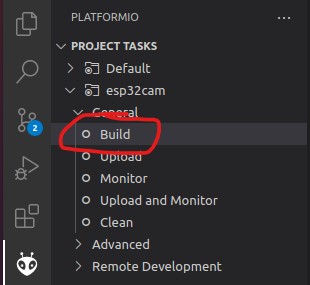
- the build artifacts are stored in
code/.pio/build/esp32cam/
- or use the graphical interface:
-
Connect the device and type
pio device monitor. There you will see your device and can copy the name to the next instruction -
Add
upload_port = you_device_portto theplatformio.inifile -
make sure an sd card with the contents of the
sd_cardfolder is inserted and you have changed the wifi details -
pio run --target eraseto erase the flash -
pio run --target uploadthis will upload thebootloader.bin, partitions.bin,firmware.binfrom thecode/.pio/build/esp32cam/folder. -
pio device monitorto observe the logs via uart