 66eb1e8d9a
* fix kernel panic (vector out of range) in getReadoutRawString * fix key of caches * fix key of caches * fix key caches * fix cache keys * fix cache keys * move set variables to top * debug * fix key * testing * try fix changelog * test * Update Changelog.md for release * Revert "Update Changelog.md for release" This reverts commit4f51ec7962. * remove testing * fix release creation * testing * Update Changelog.md for release * test * Revert "Merge branch 'master' of https://github.com/haverland/AI-on-the-edge-device" This reverts commitf68695a4c0, reversing changes made toa096cf7182. * Revert "test" This reverts commita096cf7182. * revert testing * #1524 - ensure the result of ZeigerEvalHybridNeu is <10 * Fix late digit transition #1503 * only initial_esp32_setup and update.zip as artefacts * remove unneeded cache * rename step ota-v2 to ota * rename ota-v2 to ota * new models - ana-class100 v1.5.4 - ana-cont-11.0.4 - dig-class100 v1.5.0 * Remove unnecessary null pointer checks #1649 Co-authored-by: github-actions <github-actions@github.com>
Build
Preparations
git clone https://github.com/jomjol/AI-on-the-edge-device.git
cd AI-on-the-edge-device
git checkout rolling
git submodule update --init
Build and Flash within terminal
See further down to build it within an IDE.
Compile
cd code
platformio run --environment esp32cam
Upload
pio run --target upload --upload-port /dev/ttyUSB0
Alternatively you also can set the UART device in platformio.ini, eg. upload_port = /dev/ttyUSB0
Monitor UART Log
pio device monitor -p /dev/ttyUSB0
Build and Flash with Visual Code IDE
-
Download and install VS Code
-
Install the VS Code platform io plugin
-
- Check for error messages, maybe you need to manually add some python libraries
- e.g. in my Ubuntu a python3-env was missing:
sudo apt-get install python3-venv
- e.g. in my Ubuntu a python3-env was missing:
-
-
git clone this project
-
in Linux:
git clone https://github.com/jomjol/AI-on-the-edge-device.git
cd AI-on-the-edge-device
git checkout rolling
git submodule update --init
-
-
in VS code, open the
AI-on-the-edge-device/code- from terminal:
cd AI-on-the-edge-device/code && code .
- from terminal:
-
open a pio terminal (click on the terminal sign in the bottom menu bar)
-
make sure you are in the
codedirectory -
To build, type
platformio run --environment esp32cam- or use the graphical interface:
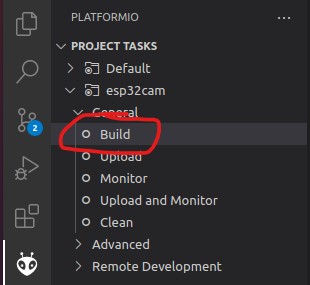
- the build artifacts are stored in
code/.pio/build/esp32cam/
- or use the graphical interface:
-
Connect the device and type
pio device monitor. There you will see your device and can copy the name to the next instruction -
Add
upload_port = you_device_portto theplatformio.inifile -
make sure an sd card with the contents of the
sd_cardfolder is inserted and you have changed the wifi details -
pio run --target eraseto erase the flash -
pio run --target uploadthis will upload thebootloader.bin, partitions.bin,firmware.binfrom thecode/.pio/build/esp32cam/folder. -
pio device monitorto observe the logs via uart