 235861eaea
- we cannot use partial initialisation of structs in C++ files (copied from example C files initially it seems)
- IRAM_ATTR uses a COUNTER, do not use the attribute on the implementation
- provide missing copy implementations for Rgb and Hsv
- one no longer can |= on volatile variables; use = | instead
- fix project and header includes
- avoid redefining BLINK_GPIO
- Remove defined but unused variables
- Fix printf formats
- Add missing case statement (HTTP_EVENT_REDIRECT)
- RMT needs to be updated to new interface (CONFIG_RMT_SUPPRESS_DEPRECATE_WARN is on currently; see https://docs.espressif.com/projects/esp-idf/en/release-v5.0/esp32/api-reference/peripherals/rmt.html)
- Adjust tcpip_adpater_* to esp_netif_*
- Use buffered versions of *ntoa* functions for IPv4 addresses and not a static on the stack (also fixes warnings)
- Whatever I missed

Co-authored-by: Bjoern A. Zeeb <patch@zabbadoz.net>
Build
Preparations
git clone https://github.com/jomjol/AI-on-the-edge-device.git
cd AI-on-the-edge-device
git checkout rolling
git submodule update --init
Build and Flash within terminal
See further down to build it within an IDE.
Compile
cd code
platformio run --environment esp32cam
Upload
pio run --target upload --upload-port /dev/ttyUSB0
Alternatively you also can set the UART device in platformio.ini, eg. upload_port = /dev/ttyUSB0
Monitor UART Log
pio device monitor -p /dev/ttyUSB0
Build and Flash with Visual Code IDE
-
Download and install VS Code
-
Install the VS Code platform io plugin
-
- Check for error messages, maybe you need to manually add some python libraries
- e.g. in my Ubuntu a python3-env was missing:
sudo apt-get install python3-venv
- e.g. in my Ubuntu a python3-env was missing:
-
-
git clone this project
-
in Linux:
git clone https://github.com/jomjol/AI-on-the-edge-device.git
cd AI-on-the-edge-device
git checkout rolling
git submodule update --init
-
-
in VS code, open the
AI-on-the-edge-device/code- from terminal:
cd AI-on-the-edge-device/code && code .
- from terminal:
-
open a pio terminal (click on the terminal sign in the bottom menu bar)
-
make sure you are in the
codedirectory -
To build, type
platformio run --environment esp32cam- or use the graphical interface:
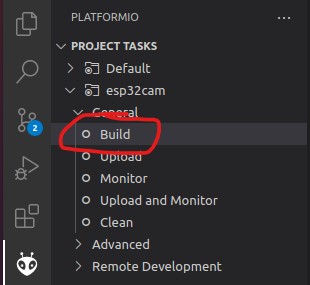
- the build artifacts are stored in
code/.pio/build/esp32cam/
- or use the graphical interface:
-
Connect the device and type
pio device monitor. There you will see your device and can copy the name to the next instruction -
Add
upload_port = you_device_portto theplatformio.inifile -
make sure an sd card with the contents of the
sd_cardfolder is inserted and you have changed the wifi details -
pio run --target eraseto erase the flash -
pio run --target uploadthis will upload thebootloader.bin, partitions.bin,firmware.binfrom thecode/.pio/build/esp32cam/folder. -
pio device monitorto observe the logs via uart