Over-The-Air (OTA) Update
You can do an OTA (over-the-air) update via the graphical user interface. Grab the firmware from the
- Releases page (Stable, tested versions), or the
- Automatically build development branch (experimental, untested versions). Please have a look on first!
You need: * firmware.bin * html.zip
General remark:
- It is always recommended to upload both files, as they are coupled to each other
- If you make a major update, it might be needed to modify the
config.inias it's syntax or context has changed - It is recommended to make a backup of the
/configdirectory, minimum of theconfig.ini.
Access to the update page:
The graphical OTA update can be accessed in the menue "System":
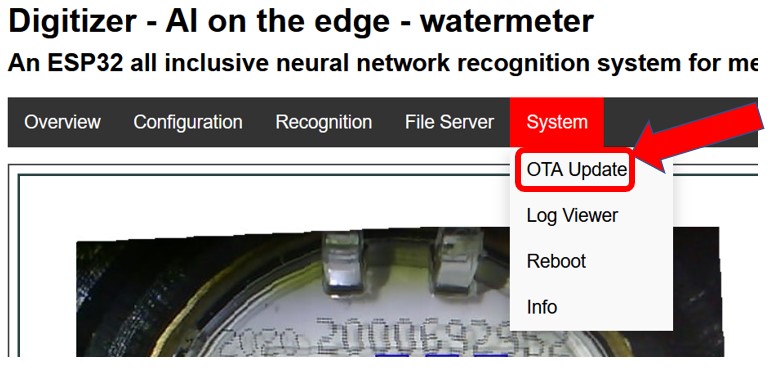
Update
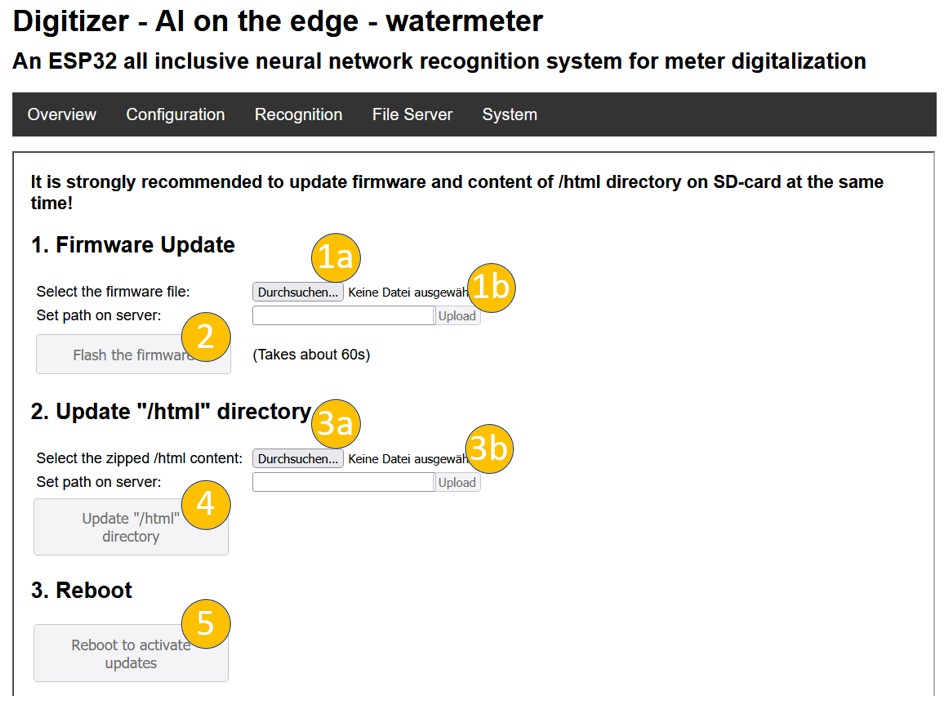
Just follow the steps 1 to 5 to perform the update:
- Select (a) and upload (b) the file
firmware.bin - Flash the firmware
- Select (a) and upload (b) the file
html.zip - Update the html-files
- Reboot
After the reboot with a major change it is recommended to check the configuration settings and save them again